Murloc RPG Walkthrough: The First Quest, From Camp Brakil to Elwynn Forest
Published · 3 min read
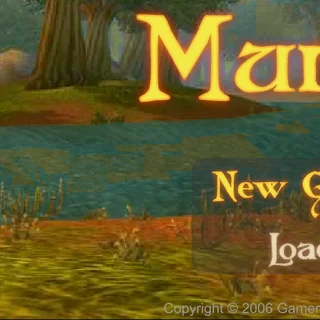
Murloc gives you almost no instructions: a title screen, a New Game button, and a murloc standing on a riverbank. This walkthrough takes you through the first quest, from the moment you appear in Camp Brakil to your first fight in Elwynn Forest, with the small things the game never tells you.
Before you move: the controls
Click the yellow question mark at the top right and open the Controls tab. It lists everything: A and D or the arrow keys to walk left and right, hold Ctrl to run, Space to interact. Dialogue advances when you click the pointing hand at the bottom of the speech box. The three square icons at the bottom right open, from left to right, your talents, your character sheet and your backpack.
Camp Brakil
You are Murk, level 1, with 85 health and 100 energy. Walk right. In the second scene a red-crested murloc with a yellow exclamation mark is waiting: that is Ketchin. Stand next to him and press Space. He tells you Chief Brakil wants to see you, and that the chief's tent is east of here.
Keep walking right. You pass the camp's weapon shop — the sign with the helmet — and a scene with a treasure chest before reaching the chief's tent. A guard stops you: the chief is not to be disturbed. Explain that you were sent for, click through the conversation, and he lets you in. Press Space at the tent door to enter.
The quest: 10 Tender Wolf Meat
Inside, walk up to the chief and press Space. Chief Brakil explains that the camp has emptied since its best warriors went off to fight the Kobolds, and that he has heard they won. There will be a banquet for them, and the camp needs Tender Wolf Meat to cook. Murk protests that he is not an experienced warrior; the chief answers that the wolves in these forests are practically harmless if you stay close to the camp. He gives you a dagger and asks for a stack of 10 Tender Wolf Meat from the woods east of the camp. The guards open the gates for you.
Equip the dagger
This is the step most people miss. The Worn Dagger goes into your backpack, not into your hand. Open the backpack (the rightmost icon) and the character sheet (the middle one): the sheet says Melee 1–1. Click the dagger in the backpack and it moves into the weapon slot; its tooltip reads 1–2 damage, and the sheet now says Melee 2–3.
Elwynn Forest
Leave the tent by walking left, then walk right past it and out through the gate. The next scene is labelled Elwynn Forest. Walk on and a wolf will come at you, and the view switches to a battle: your portrait on the left, the enemy on the right with its level in the corner, and a menu with Attack, Skills, Spells, Items and Flee.
The first thing we met was a Wolf Cub at level 4 with 60 health, which clawed and bit a level-1 Murk for about 12 health per turn. That is a fight a bare-handed murloc loses. With the dagger equipped it is closer, but if your health drops toward a third, Flee is a perfectly good choice: you are put back in the forest at full strength to try again.
Save before you go further
Click the question mark and choose Save Game. There are three slots, and each one shows your name, level, where you are and your Fury and Magic points. The save lives in your browser, so it survives closing the tab. When you come back, press Load on the title screen and click your slot.
From here the game is yours: collect the meat, bring it to the chief, and see where the next quest sends you. The places further out have names like Stonecairn River and Jasperdine Mine, and the enemies grow from wolf cubs to crocolisks and kobold miners. For what to do with your energy once the skills unlock, read the skills, spells and energy guide.
More from the blog
- Murloc RPG Skills, Spells and Energy: Fury and Magic Explained
Health, Energy, the Fury and Magic talents, and what Charge, Execute, Bloodrage, Adrenaline Rush, Pyroblast and Polymorph actually do.